Installation
state.js 0.2.0 (104kB)16.5kB min/gz
In Node.js
State can be installed as a Node.js module via npm:
$ npm install statevar state = require('state');state = require 'state'In the browser
State can be included using your favorite package manager, or directly:
<script src="state.js"></script>which will expose the module at window.state. You may wish to avoid the global reference and instead hold State within a closure by calling noConflict:
( function () {
    var state = window.state.noConflict();
    // ...
}() );
state = window.state.noConflict()
# ...Getting started
Step 0 — The state function
The State module is exported as a function named state, which can be used for either of two purposes:
Implementing state into an object
state( owner, attributes, expression )
state( owner, expression )state( owner, attributes, expression )
state( owner, expression )Given two object-typed arguments owner and expression, calling state will augment owner with its own working state implementation based on the contents of expression (and any keywords included in the optional attributes string). The newly stateful owner’s initial state is returned.
Expressing a state’s content
state( attributes, expression )
state( expression )
state( attributes )state( attributes, expression )
state( expression )
state( attributes )Given a single expression object (and optional attributes), calling state will create and return a state expression that describes the intended content of a state. This usage of state is most often employed within the expression argument of an outer state call, to define constituent substates.
Step 1 — Building a state expression
The state function’s expression argument, usually an object literal, describes the constituent states, methods, and other features that will form the state implementation of its owner:
var person = {
    greet: function () { return "Hello."; }
};

state( person, {
    Formal: {
        greet: function () { return "How do you do?"; }
    },
    Casual: {
        greet: function () { return "Hi!"; }
    }
});
person =
greet: -> "Hello."
state person,
Formal:
greet: -> "How do you do?"
Casual:
greet: -> "Hi!"Here, person is the owner, greet is its method, and Formal and Casual are states, inside each of which is a stateful method that will override person.greet.
Step 2 — Accessing an object’s state
After calling state to implement state into person, the new state implementation will be exposed through a special accessor method at person.state.
Calling the accessor method with no arguments queries the object for its current state:
person.state(); // >>> State ''person.state() # >>> State ''In this case the current state of person is its top-level root state, whose name is always the empty string ''. While person is in this state it will exhibit its default behavior:
person.greet(); // >>> "Hello."person.greet() # >>> "Hello."Step 3 — Transitioning between states
The object’s current state may be reassigned to a different state by calling its change method and providing it the name of a state to be targeted. Transitioning between states allows an object to exhibit different behaviors:
person.state().change('Formal');
person.state();                   // >>> State 'Formal'
person.greet(); // >>> "How do you do?"person.state().change 'Formal'
person.state() # >>> State 'Formal'
person.greet() # >>> "How do you do?"A sugary alternative to change() is to prepend a transition arrow to the targeted state’s name, and pass this string into the accessor method:
person.state('-> Casual');
person.state();                   // State 'Casual'
person.greet();                   // >>> "Hi!"

person.state('-> Formal');
person.state();                   // State 'Formal'
person.greet();                   // >>> "How do you do?"

person.state('->');                                           // [1]
person.state();                   // State ''
person.greet(); // >>> "Hello."person.state '-> Casual'
person.state() # >>> State 'Casual'
person.greet() # >>> "Hi!"
person.state '-> Formal'
person.state() # >>> State 'Formal'
person.greet() # >>> "How do you do?"
person.state '->' # [1]
person.state() # >>> State ''
person.greet() # >>> "Hello."
- A naked transition arrow implies a transition that targets the root state (
'').
Overview
The points listed here summarize the discussions that follow in the Concepts section.
-
States — A state acts on behalf of an owner object to describe the owner’s behavior at a given moment. The owner is able to express and alter its various behaviors by occupying and transitioning between its states.
-
Object model —
States may inherit and be composed from otherStates. The hierarchical superstate–substate relation defines a state tree rooted from the owner’s unique root state. The compositional parastate relation further provides linearized multiple inheritance over the owner’s state tree.States also observe indirect prototypal inheritance via the protostate–epistate relation implied by State implementations on any prototype of the owner. -
Expressions — A state expression describes the contents of a state. States may be expressed concisely with an object literal, which, along with an optional set of attribute keywords, can be passed into the
state()function. There the provided input is interpreted into a formalStateExpression, which can then be used to createStateinstances. -
Selectors — An
owner’s accessor methodowner.state()can be called without arguments to retrieve the object’s current state, or, if provided a selector string, toqueryfor a specificStateor a specific set ofStates. -
Attributes — A state expression may include a set of attribute keywords (e.g.:
mutable,initial,conclusive,abstract, etc.), which will enable features or impose constraints for theStatethat the expression is to represent. -
Data — Arbitrary data can be attached to each
State, and will be inherited accordingly through protostates, parastates, and superstates. -
Methods — Behavior is modeled by defining state methods that override the owner’s methods. Method calls on the owner are dispatched automatically to the proper implementation, given the owner’s current state. Consumers of the owner can therefore call its methods as usual, agnostic to what its current state is, or even to the existence of any formal concept of “state”.
-
Transitions — When an object is directed to change from one state to another, it does so by temporarily entering into a transition state. A state expression may include transition expressions that describe, given a specific pairing of origin and target states, a synchronous or asynchronous action to be performed over the duration of the transition.
-
Events — A
Stateaccepts listeners for specific event types, which will be called as theStateis affected by a progressing transition, as theStateitself experiences changes to its content, or upon theState’s construction or destruction. State also allows for the definition of custom typed events, which can be emitted from a particular state and propagated to listeners bound to the state itself as well as its protostates and superstates. -
Guards may be applied to a state to govern its viability as a transition target, dependent on the outgoing state and any other conditions that may be defined. Likewise guards may also be included in transition expressions, where they are used to select a particular transition to execute. Guards are evaluated as predicates if supplied as functions, or as static boolean values otherwise.
Concepts
States
Instances of State encapsulate the condition and behavior of an owner object at a given moment. A State is comprised of collections of methods, arbitrary data, events, guards, substates, and transition expressions.
An owner usually bears multiple States, and occupies one of these as its current state, during which the owner’s methods will exhibit any behaviors described by that state. Differential behavior is then expressed by instigating a transition, which moves the owner’s currency from the previously current state to the transition’s target state.
Object model
State objects are modeled by a set of relational references that define three distinct dimensions or “axes”.
Fundamentally the State model is hierarchical, describing a rooted tree of States belonging to a unique owner object. Starting with the owner’s unique root state, each State may serve as a superstate from which any number of substates inherit.
A State may also inherit from zero or more parastates, providing a means to define compositional relations, implemented via C3 linearized multiple inheritance.
An owner’s state tree is further heritable by any prototypal inheritors of that owner, which view their prototype’s States as protostates from which their own epistates inherit.
var p = {};
state( p, {
    A: state,
    B: state({
        BA: state,
        BB: state
    })
});

var o = Object.create( p );
state( o, {
    A: state({
        AA: state.extend('X, Y')
    }),
    X: state,
    Y: state
});
class Class
state p = @::,
A: state
B: state
BA: state
BB: state
state o = new Class,
A: state
AA: state.extend 'X, Y'
X: state
Y: state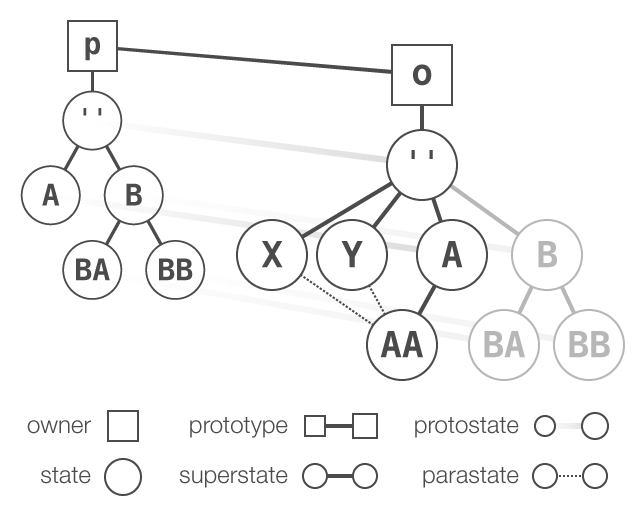
Resolving inherited content for a given State S follows the fundamental relation precedence:
- the protostate chain of S
- the parastates of S, in declared order
- the superstate of S
where the full depth of all parastate and superstate ancestors of S is linearized into a resolution order, or “parastate–superstate chain”, and the protostate chain of each State in this list is traversed in turn, thereby covering the entire ancestry of S, in all dimensions, and in regular, monotonic order.
The root state
All State–affected owner objects bear a single root state. The root state’s name is uniquely identified as the empty string ''.
owner.state().root === owner.state('');   // >>> true (invariant)
owner.state('->');
owner.state(); // >>> State ''owner.state().root is owner.state '' # >>> true (invariant)
owner.state '->'
owner.state() # >>> State ''By default the owner’s initial current state will be set to the root state — unless the root state is marked with the abstract attribute, or another State in the tree is marked with the initial attribute.
The root state also serves as a store for methods of the owner which are overridden by any of the owner’s States. Such methods are swapped into the root state, and replaced on the owner with dispatchers, which delegate calls received by the owner to the owner’s current state. From this it follows that the owner will exhibit its default behavior whenever its root state is current.
SEE ALSO
Superstates and substates
An owner object’s expressed behavior is specified by substates, and conversely generalized by superstates.
var o = {};
state( o, {
    A: state({
        AA: state,
        AB: state
    }),
    B: state
});


var root = o.state('');                    // >>> RootState
o.state() === root;                        // >>> true
o.state('-> AA');
o.state() === o.state('AA');               // >>> true
o.state().superstate === o.state('A');     // >>> true
o.state().superstate.superstate === root;  // >>> true
state o = {},
A: state
AA: state
AB: state
B: state
root = o.state '' # >>> RootState
o.state() is root # >>> true
o.state '-> AA'
o.state() is o.state 'AA' # >>> true
o.state().superstate is o.state 'A' # >>> true
o.state().superstate.superstate is root # >>> true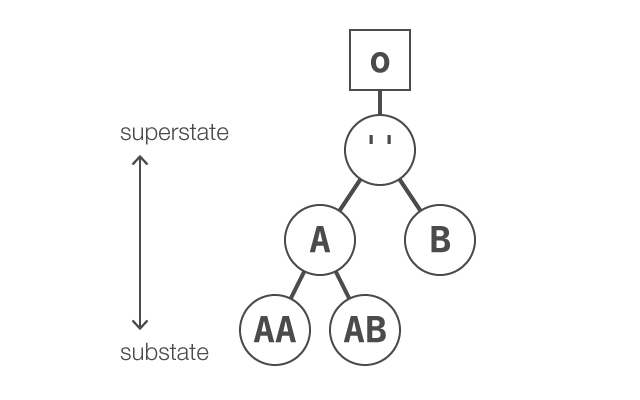
The superstate axis — A stateful owner bears a rooted state tree. Each
Statein the tree may bear zero or more substates, and accordingly trace a superstate chain up to the uniqueRootState. Most of aState’s content, including methods, data, events, etc. may be inherited from superstates and extended or overridden by substates.
A notable distinction of State from other hierarchical state implementations is that an owner’s currency is not necessarily confined to “leaf” states. The owner is free both to exhibit specific behavior by transitioning to a state nested deeper in the tree, and also to exhibit more generic behavior by transitioning to a concrete interior superstate.
SEE ALSO
Parastates and composition
Alongside conventional single inheritance via superstates, the State model also provides multiple inheritance with the parastate relation. States inherit directly from zero or more parastates, followed by exactly one superstate.
The lone exception to this is a
RootState, which bears neither relation.
Parastates are declared with the state.extend function, which takes a string of one or more paths to parastates, along with optional parameters attributes and expression, and returns a StateExpression that can be used to produce a State with the named parastates.
var o = {};
state( o, {
    A: state({
        AA: state.extend('X, Y')
    }),
    X: state,
    Y: state
});
state o = {},
A: state
AA: state.extend 'X, Y'
X: state
Y: stateState
AAinherits conventionally from superstateA, but not before inheriting compositionally from parastatesXandY.
Linearization, inheriting precedence, and monotonicity
The resolution order by which a State inherits from its lineage of parastate and superstate ancestors is guaranteed to be unambiguous. It is also guaranteed to be monotonic relative to the resolution order for any descendants of the State:
-
Given
StateS with ancestorStates A and B (either parastates or superstates), where A precedes B in the resolution order of S; -
A
StateT, to which S is related as either a parastate or superstate of T, is guaranteed to encounter A before B in its own resolution order.
These assertions are enforced by an implementation of the C3 linearization algorithm (Dylan, Perl, Python) — with the State–specific stipulations that:
-
A
State’s “parents” are defined and ordered by its immediate parastates, in declared order, followed by its immediate superstate. -
A
RootStateby rule cannot inherit from parastates, and by definition does not inherit from a superstate.
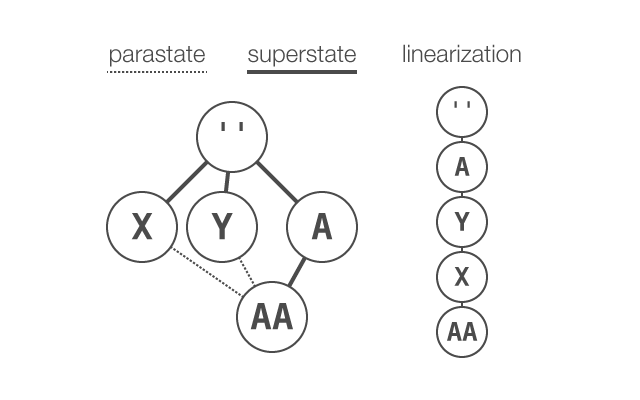
Parastate–superstate graph and linearization — from the example code above, parastates
XandYofStateAAare depicted to the left of its superstateA, indicating the superstate’s intrinsic position as the “final parent” of aState. The linearization ofAAdetermines the precedence, or resolution order, by which theStatewill inherit methods, data, and events defined in its ancestors.
Attempting to implement an expression that produces a State graph which does not conform to the C3 restrictions will throw a TypeError.
Prototypal flattening
In the State model, a State and its parastates must share a common owner. However, parastate declarations may include paths that resolve to States belonging to a prototype of the owner. In such a case these “proto-parastates” are automatically flattened onto the owner’s state tree:
-
Given
StateS withownerO, which has prototype P, where P bears aStateA whose path is'A', and given that S declares path'A'as a parastate relation; -
As O contains no
Statewith path'A', the protostate A belonging to P will be automaticallyvirtualized andrealized — effectively flattening it — into the state tree of O as an epistate Aʹ, with path'A', such that S may inherit from parastate Aʹ.
Miscellanea
-
The progression of a transition is conceptually orthogonal to the parastate relation, and traversal proceeds only over the state tree defined by the superstate–substate relations.
-
Parastates provide for compositional reuse of only their own or inherited methods, data, and custom events. Built-in events, guards, substates, transitions, and attributes are not heritable via parastate.
SEE ALSO
Protostates and epistates
The relation between an object and its prototype is reflected throughout the State implementation of each. Inheritors of a State–affected prototype view its States as their protostates; conversely, matching States of an inheritor are epistates of their respective protostates.
This indirect prototypal relation defined by protostates and epistates confers many of the benefits of language-level prototypal reuse patterns to States without entangling them in any direct prototypal relationships themselves.
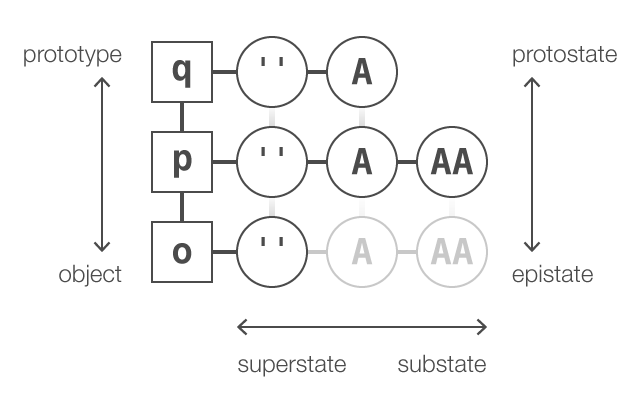
The protostate axis — A particular superstate chain (root–
A–AA) is viewed here along the horizontal axis, within the prevailing context of a prototype chain (q–p–o) on the vertical axis. The prototypal relation between these owner objects implicitly defines protostate chains which link analogously-pathedStates, e.g. (qA–pA–oA) and (pAA–oAA), along a parallel vertical axis.
In this diagram the inheriting owner
odefines no real states of its own, other than the root, however it still views statespAandpAAas its protostates, and may inherit these as virtual epistates, indicated by the faded appearance ofoAandoAA. In this manner, state content, behavior, etc. defined forpandqwill also be exhibited byo, just as if those states had been defined directly onoitself.
The following example shows an object that, rather than being affected by the state() function directly, instead inherits from a prototype which already bears a state implementation.
function Person () {}
Person.prototype.greet = function () { return "Hello."; };
state( Person.prototype, {
    Formal: {
        greet: function () { return "How do you do?"; }
    },
    Casual: {
        greet: function () { return "Hi!"; }
    }
});

var person = new Person;
'state' in person;                 // >>> true
person.hasOwnProperty('state');    // >>> false
class Person
greet: -> "Hello."
state @::,
Formal:
greet: -> "How do you do?"
Casual:
greet: -> "Hi!"
person = new Person
'state' of person # >>> true
person.hasOwnProperty 'state' # >>> falseHere
person, lacking a state implementation of its own, inherits thestatemethod from its prototype. Whenperson.state()is invoked, a new state implementation is automatically created forperson, which is given its ownstatemethod and an emptyRootState.
person.state();                    // >>> State ''
person.hasOwnProperty('state'); // >>> trueperson.state() # >>> State ''
person.hasOwnProperty 'state' # >>> trueHenceforth
personwill automatically inherit all content from its protostates, but will independently maintain its own currency and transitions over the inherited protostates, leaving the currency of the prototype unaffected.
person.greet();                    // >>> "Hello."

person.state('-> Casual');
person.state();                    // >>> State 'Casual'
person.greet();                    // >>> "Hi!"

Person.prototype.state(); // >>> State ''person.greet() # >>> "Hello."
person.state '-> Casual'
person.state() # >>> State 'Casual'
person.greet() # >>> "Hi!"
Person::state() # >>> State ''Virtual epistates
When an accessor method (person.state) is called, it first checks the context object (person) to ensure that it has its own accessor method. If it does not, and is instead attempting to inherit the accessor (state) of a prototype, then an empty state implementation is automatically created for the inheritor, which in turn generates a corresponding new accessor method (person.state), to which the original call is then forwarded. The new state tree of person will consist only of an empty root state, but this is sufficient to allow the object to inherit from any of its protostates while maintaining its own independent currency.
When an inheritor adopts a protostate as its current state, the currency is borne by a temporary, lightweight virtual epistate that is created in the inheritor’s state tree. Virtual states exist only so long as they are active and necessary; once the object transitions elsewhere, any virtual states consequently rendered inactive are automatically destroyed.
RootState createAccessorStateconstructorState::getProtostate
Expressions
State instances are defined declaratively using the state expression data structure.
A formal StateExpression is created by calling the state() function with no owner argument, providing it only a plain object map for its expression argument, optionally preceded by a string of whitespace-delimited attributes to be encoded into the returned StateExpression.
Internally, the contents of a state expression are shaped according to a set of objects that represent categories, which include data, methods, events, guards, substates, and transitions. The object map supplied to the state() call can be structured according to these categories, or it may be pared down to a more convenient shorthand, which, by making certain type inferences, the state() call will interpret into a properly shaped StateExpression.
Structured state expressions
Building upon the introductory example, we could write a state expression that consists of explicitly categorized members (substates, methods, events, etc.), looking something like this:
var longformExpression = state({
    methods: {
        greet: function () { return "Hello."; }
    },
    states: {
        Formal: {
            methods: {
                greet: function () { return "How do you do?"; }
            },
            events: {
                enter: function () { this.wearTux(); }
            }
        },
        Casual: {
            methods: {
                greet: function () { return "Hi!"; }
            },
            events: {
                enter: function () { this.wearJeans(); }
            }
        }
    }
});
// >>> StateExpression
longformExpression = state
methods:
greet: -> "Hello."
states:
Formal:
methods:
greet: -> "How do you do?"
events:
enter: -> do @wearTux
Casual:
methods:
greet: -> "Hi!"
events:
enter: -> do @wearJeans
# >>> StateExpressionShorthand
Explicitly categorizing the defined members is unambiguous, but it can be verbose, so state() also accepts a more concise expression format, which is interpreted into a StateExpression that is materially identical to the result of the example above:
var shorthandExpression = state({
    greet: function () { return "Hello."; },

    Formal: {
        enter: function () { this.wearTux(); },
        greet: function () { return "How do you do?"; }
    },
    Casual: {
        enter: function () { this.wearJeans(); },
        greet: function () { return "Hi!"; }
    }
});
// >>> StateExpression
shorthandExpression = state
greet: -> "Hello."
Formal:
enter: -> do @wearTux
greet: -> "How do you do?"
Casual:
enter: -> do @wearJeans
greet: -> "Hi!"
# >>> StateExpressionIn this example, the state() invocation interpreted the input by:
-
recognizing the absence of any items whose keys are category names, and instead inferring that object literals
FormalandCasualdescribe states. -
identifying
enteras a built-in event type, and thus treating the associated function values as listeners forenterevents that will be emitted by the containing state. -
inferring that functions keyed
greet, which is not a built-in event type, were to be treated as a method of the containing state.
Explicit definition can also be mixed freely with shorthand in the same expression input, so as to resolve ambiguities in certain edge cases (for example, to create a state named data, or a method named enter).
Interpreting expression input
Expression input provided to state() is interpreted according to the following type inference rules:
-
If an entry’s value is a typed
StateExpressionorTransitionExpression, interpret it as-is, using the entry’s key as its name, or, if the entry’s value is the exportedstatefunction itself, interpret it as an empty state whose name is the entry’s key. -
Otherwise, if an entry’s key is a category name, and its value is either an object or
null, then it will be interpreted as it would in the long-form structured format. -
Otherwise, if an entry’s key matches a built-in event type or if its value is a string, then interpret the value as either an event listener function, an array of event listeners, or a named transition target to be bound to that event type.
-
Otherwise, if an entry’s key matches a guard action (i.e.,
admit,release), interpret the value as a guard condition (or array of guard conditions). -
Otherwise, if an entry’s value is an object, interpret it as a substate whose name is the entry’s key, or if the entry’s value is a function, interpret it as a method whose name is the entry’s key.
Selectors
If called with no arguments, a stateful object’s accessor method (object.state) returns the object’s current state. If a selector string argument is provided, the accessor will query the object’s state tree and return a matching State.
var o = {};
state( o, {
    A: {
        AA: state( 'initial', {
            AAA: state
        }),
        AB: state
    },
    B: state
});

o.state();            // >>> State 'AA'
o.state('');          // >>> State ''
o.state('A.AA.AAA');  // >>> State 'AAA'
o.state('.');         // >>> State 'AA'
o.state('..');        // >>> State 'A'
o.state('...');       // >>> State ''
o.state('.AAA');      // >>> State 'AAA'
o.state('..AB');      // >>> State 'AB'
o.state('...B');      // >>> State 'B'
o.state('AAA');       // >>> State 'AAA'
o.state('.*');        // >>> [ State 'AAA' ]
o.state('AAA.*');     // >>> []
o.state('*');         // >>> [ State 'A', State 'B' ]
o.state('**');        // >>> [ State 'A', State 'AA', State 'AAA',
                      //       State 'AB', State 'B' ]
o = {}
state o,
A:
AA: state 'initial',
AAA: state
AB: state
B: state
o.state() # >>> State 'AA'
o.state '' # >>> State ''
o.state 'A.AA.AAA' # >>> State 'AAA'
o.state '.' # >>> State 'AA'
o.state '..' # >>> State 'A'
o.state '...' # >>> State ''
o.state '.AAA' # >>> State 'AAA'
o.state '..AB' # >>> State 'AB'
o.state '...B' # >>> State 'B'
o.state 'AAA' # >>> State 'AAA'
o.state '.*' # >>> [ State 'AAA' ]
o.state 'AAA.*' # >>> []
o.state '*' # >>> [ State 'A', State 'B' ]
o.state '**' # >>> [ State 'A', State 'AA', State 'AAA',
# State 'AB', State 'B' ]State uses a simple selector format:
-
State names are delimited from their member substates with the dot (
.) character. -
A selector that begins with
.is first evaluated relative to the local context state, while a selector that begins with a name will be evaluated as absolute, i.e., relative to the root state. -
A fully-qualified name is not necessary except for disambiguation:
'A.B.C'and'C'will both resolve to the deep substate namedCprovided that there is no other state namedClocated higher in the state tree. -
Special cases: empty-string
''references the root state; single-dot.references the local context state; double-dot..references its immediate superstate, etc. -
Querying a selector ending in
*returns an array of the immediate substates of that level, while**returns a flattened array of all descendant substates of that level.
Selectors are similarly put to use elsewhere as well: a transition’s origin and target properties are evaluated as selectors; and several State methods, including change, is, isIn, has, isSuperstateOf, and isProtostateOf, accept a selector as their main argument.
Attributes
State expressions may include a space-delimited set of attributes, provided as a single string argument that precedes the object map within a state() call.
state( obj, 'abstract', {
    Alive: state( 'default initial mutable', {
        update: function () { /*...*/ }
    }),
    Dead: state( 'final', {
        update: function () { /*...*/ }
    })
});
state obj, 'abstract',
Alive: state 'default initial mutable',
update: -> # ...
Dead: state 'final',
update: -> # ...An expression’s attributes modify any State instance constructed from the expression, so as to enable certain features or impose useful constraints on the state.
Mutability attributes
By default, states are weakly immutable — their data, methods, guards, substates, and transitions cannot be altered once the state has been constructed — a condition that can be affected at construct-time by the mutability attributes mutable, finite, and immutable, listed here in order of increasing precedence.
Declaring a state mutable allows it and any states that inherit from it to be modified after it is constructed. This can be partially restricted by declaring finite, which disallows addition or removal of substates. Mutability can be ultimately restricted by declaring a state immutable, which disallows modification absolutely, for all inheritors.
Each of the mutability attributes is implicitly inherited from any of the state’s ancestors, be they superstates or protostates.
Abstraction attributes
State does not confine currency to “leaf” states. All states, including substate-bearing interior states, are concrete by default, and thus may be targeted by a transition. Nevertheless, sometimes it may still be appropriate to author abstract states whose purpose is limited to serving as a common ancestor from which concrete descendant states will inherit. The abstraction attributes abstract, concrete, and default control these restrictions.
Transitions that target an abstract state are redirected to its default substate. If no substate is marked default, the transition is redirected to the abstract state’s first substate. If the redirection target is itself abstract, the redirection recurses until a concrete descendant is found.
Each of the abstraction attributes is inherited from protostates, but not from superstates. States may override an abstract attribute by applying the concrete attribute.
Destination attributes
An object’s currency must often be initialized or confined to particular states, as directed by the destination attributes initial, conclusive, and final.
The conclusive attribute traps an object’s currency; once a conclusive state is entered, it cannot be exited, though transitions that take place entirely within the conclusive state may proceed. Similarly, once an object arrives at a final state, no further transitions are allowed.
Each of the destination attributes are inherited from protostates, but not from superstates.
Data
Arbitrary data can be attached to a state, and inherited accordingly through protostates and superstates. Data properties are declared within a state expression under the data category. Properties can be read using the get method. For mutable states, properties can be added and written to using let and set, and removed with delete. Data can also be manipulated transactionally with the data method.
function Chief () {
    state( this, 'mutable', {
        Enraged: {
            Thermonuclear: {
                data: {
                    mission: 'destroy'
                    budget: Infinity
                }
            }
        }
    });
}
state( Chief.prototype, {
    data: {
        mission: 'innovate',
        budget: 10000000000
    },
    Enraged: {
        data: {
            action: 'compete'
        }
    }
}


var mobs = new Chief;
mobs.state().data();
// >>> { mission: 'innovate', budget: 10000000000 }

mobs.state('-> Enraged');
mobs.state().data({ target: 'Moogle' });
mobs.state().data();
// >>> { target: 'Moogle', mission: 'compete', budget: 10000000000 }

mobs.state().go('Thermonuclear');
mobs.state().data();
// >>> { target: 'Moogle', mission: 'destroy', budget: Infinity }
class Chief
state @::,
data:
mission: 'innovate'
budget: 10000000000
Enraged:
data:
mission: 'compete'
constructor: ->
state this, 'mutable',
Enraged:
Thermonuclear:
data:
mission: 'destroy'
budget: Infinity
mobs = new Chief
mobs.state().data()
# >>> { mission: 'innovate', budget: 10000000000 }
mobs.state '-> Enraged'
mobs.state().data target: 'Moogle'
mobs.state().data()
# >>> { target: 'Moogle', mission: 'compete', budget: 10000000000 }
mobs.state().go 'Thermonuclear'
mobs.state().data()
# >>> { target: 'Moogle', mission: 'destroy', budget: Infinity }Methods
A core feature of State is the ability for an object to exhibit any of multiple well-defined behaviors. This is achieved with state methods, which may override or augment the methods of a State’s owner anytime that State is current or active.
Dispatchers
When applied to an owner object by calling state(), State first identifies any methods already present on the owner for which there exists at least one override somewhere within the provided state expression, and relocates these methods to the new root state. For all state methods, a special dispatcher method is then instated on the owner at the corresponding key.
The dispatcher’s job is to redirect all invocations to the owner’s current state, from which State will then locate and invoke the proper stateful implementation of the method. If no active states contain an implementation for the invoked method, the invocation will be forwarded to the owner’s original implementation of the method, if one exists, or will cause a noSuchMethod event otherwise.
function shoot () { return "pew!"; }
var raygun = { shoot: shoot };

// First, affirm the identity of the function serving as the `shoot`
// method of `raygun`.
raygun.shoot === shoot;                     // >>> true

// Make `raygun` stateful. Its initial state will be the root state.
state( raygun, {
    RapidFire: {
        shoot: function () {
            return "pew pew pew!";
        }
    }
});

// Demonstrate that the function serving as the `shoot` method of
// `raygun` has been changed, that it has been replaced with a new
// dispatcher method, and that the original has been moved to the
// root state and, since `raygun` is presently in that state, can be
// be called in the normal fashion.
raygun.shoot === shoot;                     // >>> false
raygun.shoot.isDispatcher;                  // >>> true
raygun.state('').method('shoot') === shoot; // >>> true
raygun.shoot();                             // >>> "pew!"

// Change `raygun` to the `RapidFire` state and demonstrate the
// difference in behavior.
raygun.state('-> RapidFire');
raygun.state();                             // >>> State 'RapidFire'
raygun.shoot();                             // >>> "pew pew pew!"
shoot = -> "pew!"
raygun = shoot: shoot
# First, affirm the identity of the function serving as the `shoot`
# method of `raygun`.
raygun.shoot is shoot # >>> true
# Make `raygun` stateful. Its initial state will be the root state.
state raygun,
RapidFire:
shoot: -> "pew pew pew!"
# Demonstrate that the function serving as the `shoot` method of
# `raygun` has been changed, that it has been replaced with a new
# dispatcher method, and that the original has been moved to the
# root state and, since `raygun` is presently in that state, can be
# called in the normal fashion.
raygun.shoot is shoot # >>> false
raygun.shoot.isDispatcher # >>> true
raygun.state('').method('shoot') is shoot # >>> true
raygun.shoot() # >>> "pew!"
# Change `raygun` to the `RapidFire` state and demonstrate the
# difference in behavior.
raygun.state '-> RapidFire'
raygun.state() # >>> State 'RapidFire'
raygun.shoot() # >>> "pew pew pew!"SEE ALSO
Method context
By default, state methods are invoked just like normal methods, in the context of the receiving owner.
However, certain methods may require awareness of the State from which it is called, for example, to delegate to a superstate’s implementation of a method. This can be expressed by wrapping a method’s function expression in a call to state.bind, which causes the method to be invoked in the context of the receiving State instead of the receiving owner. This exposes reliable references to this.superstate, this.root, and any other relative location in the receiving owner’s state tree, along with, importantly, the owner itself via this.owner.
In this way delegation to a superstate’s method is facilitated by the apply and call methods of State:
state( owner, {
    A: {
        bang: function ( arg1, arg2 ) { /* ... */ },
        AA: {
            bang: state.bind( function () {
                this.owner === owner;  // true
                return this.superstate.apply( 'bang', arguments );
            })
        }
    }
});
state owner,
A:
bang: ( arg1, arg2 ) -> # ...
AA:
bang: state.bind ->
@owner is owner # true
@superstate.apply 'bang', argumentsWorth noting here is the significant difference distinguishing these apply and call methods from their familiar Function.prototype counterparts: whereas for a function, the first argument accepted by apply and call is a context object, for the State::apply and State::call methods, the first argument is a string that names a method on that state to be invoked.
SEE ALSO
Lexical bindings
A state method may require awareness of the precise State in which it is defined, which is necessary for introspection and delegation along the protostate axis.
This can be expressed by enclosing a method’s function expression in a decorator, and passing this to state.fix — a pattern that lexically binds additional State context into the method.
var q = {
  foo: "FOO", bar: "BAR",
  m: function () { return this.foo; }
};
state( q, {
  A: {
    m: state.bind( function () {
      return this.superstate.call('m') + this.owner.bar;
    }),
    AA: state
  }
});

var p = Object.create( q );
p.baz = "BAZ";
state( p, {
  A: {
    m: state.fix( function ( autostate, protostate ) {
      return function () {
        return protostate.call('m') + this.baz;
      };
    })
  }
});

var o = Object.create( p );
o.m();              // >>> "FOO"

o.state('-> AA');
o.m();              // >>> "FOOBARBAZ"
class Superclass
foo: "FOO", bar: "BAR"
m: -> @foo
state @::,
A:
m: state.bind ->
@superstate.call('m') + @owner.bar
AA: state
class Class extends Superclass
baz: "BAZ"
state @::,
A:
m: state.fix ( autostate, protostate ) -> ->
protostate.call('m') + @baz
o = new Class
o.m() # >>> "FOO"
o.state '-> AA'
o.m() # >>> "FOOBARBAZ"Decoration via fix provides the state-lexical references:
autostate: the preciseStatein which the method is defined.protostate: the protostate ofautostate.
Should a function require insight into both its calling context and its state-lexical environment, this can be composed neatly with both fix and bind:
var p = Object.create( q );
p.baz = "BAZ";
state( p, {
  A: {
    m: function () { return this.baz; },
    AA: {
      m: state.fix( function ( autostate, protostate ) {
        return state.bind( function () {
          return protostate.call('m') + this.superstate.call('m');
        });
      })
    }
  }
});
class Class extends Superclass
baz: "BAZ"
state @::,
A:
m: -> @baz
AA:
m: state.fix ( autostate, protostate ) -> state.bind ->
protostate.call('m') + @superstate.call('m')In such a case the distinction and relationship between autostate and this is important: if a function is inherited from a protostate, then autostate will accordingly be a protostate of this; if the function is not inherited, then autostate and this are identical.
SEE ALSO
Handling calls to currently nonexistent methods
In the case of an attempt to call or apply a state method that does not exist within that state and cannot be inherited from any protostate or superstate, the invocation will act as a no-op, returning undefined.
State allows such a contingency to be trapped by emitting a generic noSuchMethod event. Listeners take as arguments the name of the sought method, followed by an Array of the arguments provided to the failed invocation.
Also emitted is a specific noSuchMethod:name event, which includes the name of the sought method. Listeners of this event take the individual arguments as they were provided to the failed invocation.
var log = function ( msg ) { return console.log( msg ); },
    owner = {},
    root;

state( owner, 'abstract', {
    foo: function () { log("I exist!"); },

    A: state( 'default', {
        bar: function () { log("So do I!"); }
    }),
    B: state
});
// >>> State 'A'

root = owner.state('');
root.on( 'noSuchMethod', function ( methodName, args ) {
    log("`owner` has no method " + methodName + " in this state!");
});
root.on( 'noSuchMethod:bar': function () {
    log("Here’s another way to trap a bad call to 'bar'.");
});

owner.foo();            // log <<< "I exist!"
owner.bar();            // log <<< "So do I!"
owner.state('-> B');
owner.state();          // >>> State 'B'
owner.foo();            // log <<< "I exist!"
owner.bar();            // >>> undefined
// log <<< "`owner` has no method 'bar' in this state!"
// log <<< "Here’s another way to trap a bad call to 'bar'."
log = ( msg ) -> console.log msg
owner = {}
state owner, 'abstract',
foo: -> log "I exist!"
A: state 'default',
bar: -> log "So do I!"
B: state
# >>> State 'A'
root = owner.state ''
root.on 'noSuchMethod', ( methodName, args ) ->
log "`owner` has no method '#{methodName}' in this state!"
root.on 'noSuchMethod:bar', ( args... ) ->
log "Here’s another way to trap a bad call to 'bar'."
owner.foo() # log <<< "I exist!"
owner.bar() # log <<< "So do I!"
owner.state '-> B'
owner.state() # >>> State 'B'
owner.foo() # log <<< "I exist!"
owner.bar() # >>> undefined
# log <<< "`owner` has no method 'bar' in this state!"
# log <<< "Here’s another way to trap a bad call to 'bar'."SEE ALSO
Examples
These examples demonstrate some of the patterns of state method inheritance. Note the points of interest numbered in the trailing comments and their explanations below:
Document
var fs = require('fs'),
    state = require('state'),
    bind = state.bind;

function Document ( location, text ) {
    this.location = function () {
        return location;
    };
    this.read = function () {
        return text;
    };
    this.edit = function ( newText ) {                      // [1]
        text = newText;
        return this;
    };
}
state( Document.prototype, 'abstract', {
    freeze: bind( function () {                             // [3]
        var result = this.call('save');                     // [4]
        this.go('Frozen');
        return result;
    }),

    Dirty: {
        save: bind( function () {
            var owner = this.owner(),
                args = [ owner.location(), owner.read() ];
            this.go( 'Saved', args );                       // [5]
            return owner;
        })
    },
    Saved: state( 'initial', {
        edit: bind( function () {
            var ss = this.superstate,
                result = ss.apply( 'edit', arguments );     // [2]
            this.go('Dirty');
            return result;
        }),

        Frozen: state( 'final', {
            edit: function () {},
            freeze: function () {}
        })
    }),

    transitions: {
        Writing: {
            origin: 'Dirty', target: 'Saved',
            action: bind( function ( location, text ) {
                var transition = this;
                function cb ( err ) {
                    if ( err ) {
                        return transition.abort( err ).go('Dirty');
                    }
                    transition.end();
                }
                return fs.writeFile( location, text, cb );
            })
        }
    }
});
fs = require 'fs'
state = require 'state'
{ bind } = state
class Document
constructor: ( location, text ) ->
@location = -> location
@read = -> text
@edit = ( newText ) -> # [1]
text = newText
this
state @::, 'abstract'
freeze: bind -> # [3]
result = @call 'save' # [4]
@go 'Frozen'
result
Dirty:
save: bind ->
args = [ @owner.location(), @owner.read() ]
@go 'Saved', args # [5]
owner
Saved: state 'initial'
edit: bind ->
result = @superstate.apply 'edit', arguments # [2]
@go 'Dirty'
result
Frozen: state 'final'
edit: ->
freeze: ->
transitions:
Writing:
origin: 'Dirty', target: 'Saved'
action: bind ( location, text ) ->
fs.writeFile location, text, ( err ) =>
return @abort( err ).go('Dirty') and this if err
do @end
- A “privileged” method
editis defined inside the constructor, closing over a private variabletextto which it requires access. Later, when state is applied to the object, this method will be moved to the root state, and a dispatcher will be added to the object in its place.
- The
editmethod override defined on theSavedstate is not closed over the constructor’s private variabletext, but it can still set the value oftextby usingthis.superstate.applyto invoke the overridden original implementation.
- The
freezemethod is declared on the abstract root state, callable from statesDirtyandSaved(but notFrozen, where it is overridden with a no-op).
- The
savemethod, which only appears in theDirtystate, is still callable from other states, as its presence inDirtycauses a no-op version of the method to be automatically added to the root state. This allowsfreezeto safely callsavedespite the possiblity of being in a state (Saved) with no such method.
- Changing to
SavedfromDirtyresults in theWritingtransition, whose asynchronousactionis invoked with the arguments array provided by the call togo.
Shooter
function Player () {
    this.health = 100;
    this.weapon = new Weapon;
}
state( Player.prototype, 'abstract', {
    Alive: state( 'default', {
        exit: function () {
            this.dropWeapon();
        },

        setHealth: function ( value ) {
            if ( 0 < value ) {
                this.health = value;
            } else {
                this.health = 0;
                this.state('-> Dead');
            }
        },

        pickUpWeapon: function ( weapon ) {
            this.dropWeapon();
            this.weapon = weapon;
        },
        dropWeapon: function () {
            this.weapon.state('-> Dropped');
            this.weapon = null;
        },

        Stationary: state({
            drawWeapon: function () {
                this.weapon.state('-> Sighted');
            }
        }),
        Moving: state( 'abstract', {
            drawWeapon: function () {
                this.weapon.state('-> Drawn');
            },
            Walking: state,
            Running: state( 'default', {
                Sprinting: state({
                    drawWeapon: function () {
                        this.weapon.state('-> Held');
                    }
                })
            })
        })
    }),
    Dead: state('final')
});

function Weapon () {}
state( Weapon.prototype, {
    Stowed: state,
    Holstered: state,
    Held: state({
        Drawn: state({
            fire: function () { return "Pew!"; },
            Sighted: state
        })
    }),
    Dropped: state
});
class Player
constructor: ->
@health = 100
@weapon = new Weapon
state @::, 'abstract',
Alive: state 'default',
exit: -> do @dropWeapon
setHealth: ( value ) ->
if 0 < value then @health = value
else @health = 0; @state '-> Dead'
pickUpWeapon: ( weapon ) ->
do @dropWeapon
@weapon = weapon
dropWeapon: ->
@weapon.state '-> Dropped'
@weapon = null
Stationary: state
drawWeapon: ->
@weapon.state '-> Sighted'
Moving: state 'abstract',
drawWeapon: ->
@weapon.state '-> Drawn'
Walking: state
Running: state 'default',
Sprinting: state
drawWeapon: ->
@weapon.state '-> Held'
Dead: state 'final'
class Weapon
state @::,
Stowed: state
Holstered: state
Held: state
Drawn: state
fire: -> "Pew!"
Sighted: state
Dropped: stateTransitions
Whenever an object’s current state changes, a transition state is created, which temporarily assumes the role of the current state while the object is travelling from its origin or source state to its target state.
Transition expressions
A state expression may include any number of transition expressions, which define some action to be performed, either synchronously or asynchronously, along with selectors for the origin/source and target states to which the transition should apply, and guards to determine the appropriate transition to employ.
Before an object undergoes a state change, it examines the transition expressions available for the given origin and target, and selects one to be enacted. To test each expression, its origin state is validated against its admit transition guards, and its target state is validated against its release transition guards. The object then instantiates a Transition based on the first valid transition expression it encounters, or, if no transition expression is available, a generic actionless Transition.
Where transition expressions should be situated in the state hierarchy is largely a matter of discretion. In determining the appropriate transition expression for a given origin–target pairing, the search proceeds, in order:
- at the expression’s
targetstate (compare to the manner in which CSS3 transitions are declared with respect to classes) - at the expression’s
originstate - progressively up the superstate chain of
target - progressively up the superstate chain of
origin
Transitions can therefore be organized in a variety of ways, but ambiguity resolution is regular and predictable, as demonstrated with the Zig transition in the example below:
// An asynchronous logger
function log ( message, callback ) { /* ... */ }

function Foo () {}
state( Foo.prototype, 'abstract', {
    Bar: state('default initial'),
    Baz: {
        transitions: {
            Zig: { action: function () {
                var transition = this;
                log( "BLEEP", function () { transition.end(); } );
            } }
        }
    },

    transitions: {
        Zig: { origin: 'Bar', target: 'Baz', action: function () {
            var transition = this;
            log( "bleep", function () { transition.end(); } );
        } },
        Zag: { origin: 'Baz', target: 'Bar', action: function () {
            var transition = this;
            log( "blorp", function () { transition.end(); } );
        } }
    }
});

var foo = new Foo;

function zig () {
    var transition;
    foo.state();                   // >>> State 'Bar'
    foo.state('-> Baz');           // (enacts `Zig` of `Baz`)
    transition = foo.state();      // >>> Transition 'Zig'
    transition.on( 'end', zag );
}

function zag () {
    var transition;
    foo.state();                   // >>> State 'Baz'
    foo.state('-> Bar');           // (enacts `Zag` of root state)
    transition = foo.state();      // >>> Transition `Zag`
    transition.on( 'end', stop );
}

function stop () {
    return "take a bow";
}

zig();
// ...
// log <<< "BLEEP"
// ...
// log <<< "blorp"
# An asynchronous logger
log = ( message, callback ) -> # ...
class Foo
state @::, 'abstract',
Bar: state 'default initial'
Baz:
transitions:
Zig: action: ->
log "BLEEP", => @end()
transitions:
Zig: origin: 'Bar', target: 'Baz', action: ->
log "bleep", => @end()
Zag: origin: 'Baz', target: 'Bar', action: ->
log "blorp", => @end()
foo = new Foo
zig = ->
foo.state() # >>> State 'Bar'
foo.state '-> Baz' # (enacts `Zig` of `Baz`)
transition = foo.state() # >>> Transition 'Zig'
transition.on 'end', zag
zag = ->
foo.state() # >>> State 'Baz'
foo.state '-> Bar' # (enacts `Zag` of root state)
transition = foo.state() # >>> Transition 'Zag'
transition.on 'end', stop
stop = -> "take a bow"
do zig
# ...
# log <<< "BLEEP"
# ...
# log <<< "blorp"The transition lifecycle
A transition performs a stepwise traversal over its domain, which is defined as the subtree rooted at the least common ancestor state between the transition’s source and target. At each step in the traversal, the transition instance acts as a temporary substate of the visited state.
The traversal sequence decomposes into an ascending phase, an action phase, and a descending phase.
-
During the ascending phase, the object emits a
departevent on thesource, and anexitevent on any state that will be rendered inactive as a consequence of the transition. -
The transition then reaches the domain root and moves into the action phase, whereupon it executes any
actionfunction defined in its associated transition expression. If anactiondoes exist, then the transition remains in the action phase until itsendmethod is called. -
Once the transition has
ended, it then proceeds with the descending phase, emittingenterevents on any state that is rendered newly active, and concluding with anarriveevent on itstargetstate.
function Mover () {}
state( Mover.prototype, {

    // Programmatically set up the root to log the transitional
    // events of all states
    construct: function () {
        var events, substates, i, j;
        events = ['depart', 'exit', 'enter', 'arrive'];
        substates = [this].concat( this.substates( true ) );
        for ( i in substates ) for ( j in events ) {
            ( function ( s, e ) {
                s.on( e, state.bind( function () {
                    console.log this.name + " " + e;
                }));
            }( substates[i], events[j] ) );
        }
    },

    Stationary: {
        Idle: state('initial'),
        Alert: state
    },
    Moving: {
        Walking: state,
        Running: {
            Sprinting: state
        }
    },

    transitions: {
        Announcing: {
            source: '*', target: '*',
            action: state.bind( function () {
                var name = this.superstate.name || "the root";
                this.end( "action of transition is at " + name );
            }),
            end: function ( message ) { console.log( message ); }
        }
    }
});


var m = new Mover;

m.state('-> Alert');
// log <<< "depart Idle"
// log <<< "exit Idle"
// log <<< "action of transition is at Stationary"
// log <<< "enter Alert"
// log <<< "arrive Alert"

m.state('-> Sprinting');
// log <<< "depart Alert"
// log <<< "exit Alert"
// log <<< "exit Stationary"
// log <<< "action of transition is at the root state"
// log <<< "enter Moving"
// log <<< "enter Running"
// log <<< "enter Sprinting"
// log <<< "arrive Sprinting"
class Mover
state @::,
# Programmatically set up the root to log the transitional
# events of all states
construct: ->
events = ['depart', 'exit', 'enter', 'arrive']
for s in [this].concat @substates true
for e in events
do ( s, e ) -> s.on e, state.bind ->
console.log "#{e} #{@name}"
Stationary:
Idle: state 'initial'
Alert: state
Moving:
Walking: state
Running:
Sprinting: state
transitions:
Announcing: source: '*', target: '*'
action: state.bind ->
name = @superstate.name or "the root"
@end "action of transition is at {name}"
end: ( message ) -> console.log message
m = new Mover
m.state '-> Alert'
# log <<< "depart Idle"
# log <<< "exit Idle"
# log <<< "action of transition is at Stationary"
# log <<< "enter Alert"
# log <<< "arrive Alert"
m.state '-> Sprinting'
# log <<< "depart Alert"
# log <<< "exit Alert"
# log <<< "exit Stationary"
# log <<< "action of transition is at the root"
# log <<< "enter Moving"
# log <<< "enter Running"
# log <<< "enter Sprinting"
# log <<< "arrive Sprinting"SEE ALSO
Aborted transitions
If a new transition is started while a transition is already in progress, an abort event is emitted on the previous transition. The new transition will reference the aborted transition as its source, retaining by reference the same origin state as that of the aborted transition, and the traversal will resume, starting with a depart and exit event emitted on the aborted transition. Further redirections of the pending traversal will continue to grow this source chain until a transition finally arrives at its target state.
SEE ALSO
Events
Events in State follow the familiar emitter pattern: State exposes methods emit (aliased to trigger) for emitting typed events, and addEvent/removeEvent (aliased to on/off and bind/unbind) for assigning listeners to a particular event type.
Existential events
Immediately after a state has been fully constructed, it emits a construct event. Likewise, immediately before a state is cleared from its superstate, or before the owner object’s state implementation is destroyed in the case of a root state, it emits a destroy event.
Transitional events
During a transition’s traversal from its origin state to its target state, the transition and all affected states along the way emit a sequence of events describing the transition’s progression.
Event sequence
State : depart — The beginning of the transition consists of exactly one depart event that is always emitted from the origin state.
Transition : enter — Next the owner object’s currency is passed from the origin state to the new Transition, and the transition emits an enter event.
State : exit — This is followed by the ascending phase of the transition, which consists of zero or more exit events, one each from amongst the origin state and any of its superstates that will no longer be active as a result of the transition.
Transition : start — When the transition reaches the top of its domain, the ascending phase ends and the action phase begins. The transition emits a start event, and its action function is invoked.
Transition : end — When the transition’s end method is called, it emits an end event, and the descending phase begins.
State : enter — The descending phase of the transition consists of zero or more enter events, one for each state that will become newly active.
Transition : exit — After the transition has entered its target state, the descending phase ends, the transition emits an exit event, and the object’s currency is passed from the transition to the target state.
State : arrive — Finally, an arrive event will occur exactly once, specifically at the target state, marking the end of the transition.
SEE ALSO
Mutation events
When a state’s contents are altered, it emits a mutate event containing the changes made relative to its immediately prior condition.
Listeners receive four objects as arguments: the contents of the mutation experienced by the state, a delta object containing the contents displaced by the mutation, and a full expression of the state’s contents both before and after the mutation.
var flavors = [
    'vanilla',
    'chocolate',
    'strawberry',
    'AmeriCone Dream'
];

function Kid () {}
state( Kid.prototype, 'mutable', {
    data: {
        favorite: 'chocolate'
    },

    waver: state.bind( function () {
        var i = Math.random() * flavors.length << 0;
        this.data({ favorite: flavors[i] });
    }),
    whine: function ( complaint ) {
        if ( typeof console !== 'undefined' ) {
            console.log( complaint );
        }
    },

    mutate: function ( mutation, replaced ) {
        this.owner().whine(
            "I hate " + replaced.favorite + ", " +
            "I want " + mutation.favorite + "!"
        );
    }
});


var jr = new Kid;

// We could have added listeners this way also:
jr.state().on( 'mutate', function ( mutation, replaced ) { /*...*/ } );

jr.waver();  // log <<< "I hate chocolate, I want strawberry!"
jr.waver();  // log <<< "I hate strawberry, I want chocolate!"
jr.waver();  // No whining! On a whim, junior stood pat this time.
jr.waver();  // log <<< "I hate chocolate, I want AmeriCone Dream!"
flavors = [
'vanilla'
'chocolate'
'strawberry'
'AmeriCone Dream'
]
class Kid
state @::, 'mutable',
data:
favorite: 'chocolate'
waver: state.bind ->
@data favorite: flavors[ Math.random() * flavors.length << 0 ]
whine: ( complaint ) ->
console?.log complaint
mutate: ( mutation, replaced ) ->
@whine "I hate #{ replaced.favorite }, " +
"I want #{ mutation.favorite }!"
jr = new Kid
# We could have added listeners this way also:
jr.state().on 'mutate', ( mutation, replaced ) -> # ...
jr.waver() # log <<< "I hate chocolate, I want strawberry!"
jr.waver() # log <<< "I hate strawberry, I want chocolate!"
jr.waver() # No whining! On a whim, junior stood pat this time.
jr.waver() # log <<< "I hate chocolate, I want AmeriCone Dream!"Custom event types
A state’s emit method allows any type of event to be broadcast and consumed.
var bind = state.bind;

function Kid () {}
state( Kid.prototype, {
    Happy: state,
    Sad: state,

    events: {
        gotIceCream: bind( function () {
            this.be('Happy');
        }),
        spilledIceCream: bind( function () {
            this.be('Sad');
        })
    }
});


var jr = new Kid;

jr.state().emit('gotIceCream');
jr.state();                          // >>> State 'Happy'

jr.state().emit('spilledIceCream');
jr.state();                          // >>> State 'Sad'
{ bind } = state
class Kid
state @::
Happy: state
Sad: state
events:
gotIceCream: bind -> @be 'Happy'
spilledIceCream: bind -> @be 'Sad'
jr = new Kid
jr.state().emit 'gotIceCream'
jr.state() # >>> State 'Happy'
jr.state().emit 'spilledIceCream'
jr.state() # >>> State 'Sad'Using events to express simple determinism
An event listener may also be expressed as just a state selector, which is interpreted as an order to transition to the indicated state after all of an event’s callbacks have been invoked. This bit of shorthand allows for concise expression of deterministic behavior, where the occurrence of a particular event type within a particular state has a definitive, unambiguous effect on the object’s currency.
function DivisibleByThreeComputer () {
    state( this, 'abstract', {
        s0: state( 'default initial',
            { '0':'s0', '1':'s1' } ),
        s1: { '0':'s2', '1':'s0' },
        s2: { '0':'s1', '1':'s2' }
    });
}
DivisibleByThreeComputer.prototype.compute = function ( number ) {
    var i, l, binary = number.toString(2);
    this.state('->'); // reset
    for ( i = 0, l = binary.length; i < l; i++ ) {
        this.state().emit( binary[i] );
    }
    return this.state().is('s0');
}

var three = new DivisibleByThreeComputer;

three.compute( 8 );          // >>> false
three.compute( 78 );         // >>> true
three.compute( 1000 );       // >>> false
three.compute( 504030201 );  // >>> true
class DivisibleByThreeComputer
constructor: ->
state this, 'abstract',
s0: state 'default initial',
'0':'s0', '1':'s1'
s1: '0':'s2', '1':'s0'
s2: '0':'s1', '1':'s2'
compute: ( number ) ->
@state '->' # reset
@state().emit symbol for symbol in number.toString 2
@state().is 's0'
three = new DivisibleByThreeComputer
three.compute 8 # >>> false
three.compute 78 # >>> true
three.compute 1000 # >>> false
three.compute 504030201 # >>> trueGuards
States and transitions can be outfitted with guards that dictate whether and how they may be used.
State guards
For a transition to be allowed to proceed, it must first have satisfied any guards imposed by the states that would be its endpoints: the origin state from which it will depart must agree to release the object’s currency to the intended target state at which it will arrive, and likewise the target must also agree to admit the object’s currency from the departed origin.
var object = {};
state( object, {
    A: state( 'initial', {
        admit: false,
        release: { D: false }
    }),
    B: state( 'mutable', {
        data: { bleep: 'bleep' },
        release: {
            'C, D': true,
            'C.**': false
        }
    }),
    C: {
        data: { blorp: 'blorp' },
        admit: true,
        C1: {
            C1a: state
        },
        C2: state
    },
    D: {
        enter: function () {
            this.state('B').removeGuard( 'admit' );
        },
        admit: function ( fromState ) {
            return 'blorp' in fromState.data()
        },
        release: function ( toState ) {
            return 'bleep' in toState.data()
        }
    }
});
object = {}
state object,
A: state 'initial',
admit: false
release: D: false
B: state 'mutable',
admit: false
release:
'C, D': true
'C.**': false
data: bleep: 'bleep'
C:
data: blorp: 'blorp'
C1:
C1a: state
C2: state
D:
enter: -> @state('B').removeGuard 'admit'
admit: ( fromState ) -> 'blorp' of fromState.data()
release: ( toState ) -> 'bleep' of toState.data()Here we observe state guards imposing the following restrictions:
-
objectinitializes into stateA, but upon leaving it may never return; we’ve also specifically disallowed direct transitions fromAtoD. -
State
Bdisallows entry from anywhere (for now), and releases conditionally toCorDbut not directly to any descendant states ofC; we also note its data itembleep. -
State
Cimposes no guards, but we note its data itemblorp. -
State
D“unlocks”B; it is also guarded by checking the opposing state’sdata, allowing admission only from states with a data item keyedblorp, and releasing only to states with data itembleep.
The result is that object is initially constrained to a progression from state A to C or its descendant states; exiting the C domain is initially only possible by transitioning to D; from D it can only transition back into C, however on this and subsequent visits to C, it has the option of transitioning to either B or D, while B insists on directly returning the object’s state only to one of its siblings C or D.
Transition guards
Transition expressions may also include admit and release guards. Transition guards are used to decide which one transition amongst possibly several is to be executed as an object changes its state between a given origin and target.
function Scholar () {}
state( Scholar.prototype, 'abstract', {
    Matriculated: state( 'initial', {
        graduate: function ( gpa ) {
            this.gpa = gpa;
            this.change( 'Graduated' );
        }
    }),
    Graduated: state( 'final' ),

    transitions: {
        Summa: {
            origin: 'Matriculated', target: 'Graduated',
            admit: function () { return this.gpa >= 3.9; },
            action: function () { /* swat down offers */ }
        },
        Magna: {
            origin: 'Matriculated', target: 'Graduated',
            admit: function () {
                var gpa = this.gpa;
                return 3.75 <= gpa && gpa < 3.9;
            },
            action: function () { /* choose internship */ }
        },
        Laude: {
            origin: 'Matriculated', target: 'Graduated',
            admit: function () {
                var gpa = this.gpa;
                return 3.50 <= gpa && gpa < 3.75;
            },
            action: function () { /* brag to the cat */ }
        },
        '': {
            origin: 'Matriculated', target: 'Graduated',
            action: function () { /* blame rounding error */ }
        }
    }
});

var scholar = new Scholar;
scholar.graduate( 3.4999 );
class Scholar
state @::, 'abstract',
Matriculated: state 'initial',
graduate: ( gpa ) ->
@gpa = gpa
@state '-> Graduated'
Graduated: state 'final'
transitions:
Summa: transition
origin: 'Matriculated', target: 'Graduated'
admit: -> @gpa >= 3.9
action: -> # swat down offers
Magna: transition
origin: 'Matriculated', target: 'Graduated'
admit: -> 3.75 <= @gpa < 3.9
action: -> # choose internship
Laude: transition
origin: 'Matriculated', target: 'Graduated'
admit: -> 3.50 <= @gpa < 3.75
action: -> # brag to the cat
'': transition
origin: 'Matriculated', target: 'Graduated'
action: -> # blame rounding error
scholar = new Scholar
scholar.graduate 3.4999About this project
Design goals
Minimal footprint
All functionality of State is to be instigated through the exported state function. It should be able both to generate state expressions and to implement expressed states into an existing JavaScript object, depending on the arguments provided. In the latter case, the newly implemented system of states should be accessible from a single object.state() method on the affected object.
Expressive power
As much as possible, State should aim to look and feel like a feature of the language. The interpreted shorthand syntax, simple keyword attributes, and limited interface should allow for production code that is terse, declarative, and easy to write and understand.
Opacity
Apart from the addition of the object.state() method, a call to state() must make no other modifications to a State–affected object’s interface. Methods are replaced with delegators, which forward method calls to the current state. This is to be implemented opaquely and non-destructively: consumers of the object need not be aware of which states are active in the object, or even that a concept of state exists at all, and a call to object.state('').destroy() must restore the object to its original form.
Roadmap
Proposed features
Concurrency
Whereas an object’s state is most typically conceptualized as an exclusive-OR operation (i.e., its current state is always fixed to exactly one state), a state may instead be defined as concurrent, relating its substates in an “AND” composition, where occupation of the concurrent state implies simultaneous occupation of each of its immediate substates.
-
Define a
Regionsubclass ofStatethat contains the currency-bearing aspect of the currentRootState; then redefineRootStateas a subclass ofRegionthat contains only the association withownerand its supplied accessor method. -
Define currency events for
Region:-
initialize :: ( initialState:State ) -> -
suspend :: ( currentState:State ) -> -
resume :: ( currentState:State ) -> -
conclude :: ( conclusiveState:State ) ->— Signals entrapment of a region’s currency within a particularStatewith attributeconclusive. Always precedes anyterminateevent. -
terminate :: ( finalState:State ) ->— Signals termination of a region’s currency. If a currency is terminated imperatively,finalStatemay be any intraregionalState; if terminated naturally,finalStatewill be an intraregionalStatewith attributefinal. (A terminal (leaf)conclusivestate may seem implicitlyfinal, but it is not; a currency in such a state, although trapped there, may be allowed to linger indefinitely before being imperatively terminated.)
-
-
Define region attributes {
permanentautonomousvolatile}:-
By default a region is recurrent; i.e. on reactivation of a concurrent superstate, a subregion that has
terminated will beinitialized with a new currency. Addingpermanentto a region’s state expression declares that theRegionwill only ever bear one currency, and its finality will persist over the life of theRegion. -
By default a region can undergo transitions only while its concurrent superstate is active; if deactivated, the region’s currency is
suspended in place, to beresumed only once the concurrent superstate becomes active again. Theautonomousattribute allows a region to remain active and continue processing transitions in the background after its concurrent superstate is deactivated. -
By default a region is persistent; it is
suspended in place if deactivated prior to beingfinalized, and on subsequent activation will beresumed from the state that was current at the time it was deactivated. Adding thevolatileattribute disables this persistence: once deactivated the region’s transition queue is drained and pending transitions are dropped, and on each reactivation the region isinitialized anew.
-
-
The destination attributes
initial,conclusive, andfinalonly affect their localRegion. -
Individual transitions are bounded within a single
Region. A transition arriving at aconcurrentstate constitutes a fork of the currency into the state’s subregions, each of which either spins up a new currency starting from its localinitialstate, orresumes asuspended currency (for subregions that are recurrent and/or persistent). -
An active subregion’s currency may
terminateand join the currency of its concurrent superstate, either by arriving at afinalstate, or imperatively. An imperative join may be extrinsic, resulting from the superregion being transitioned away from the concurrent superstate, or intrinsic, resulting from a call toState::joinfrom within the subregion, which terminates the currency and finalizes it to the current state. -
An object’s “current state” becomes the set of currencies in all active
Regions; i.e. its state configuration. Representation of the state configuration as a selector string must use nested parens()or similar to group adjacent regions, delimited by,,;, or similar. -
An
owner’s dispatcher methods are guaranteed to resolve only within the region defined by the root state, and may be stopped at any activeconcurrentstate. Dispatch continues automatically iff the regions are orthogonal, which requires that methods be implemented in no more than one of the subregions. In the ambiguous, non-orthogonal case, dispatch stops descending at the concurrent state, which must contain a spread implementation that “weaves” the dispatch into the multiple regions, and then determines for itself how to reduce the values returned from each region into a single value to be returned to the dispatcher method. A default concurrent method implementation may be made available, which would simply dispatch to each region in a particular order and then return an array of the returned values. -
Resolutions that traverse up a superstate chain are blocked ahead of a concurrent state’s spread implementation, and must stop at the boundary of the subregion.
-
Events may propagate through all subregions unrestricted, as they have no return value.
History
Any state may be directed to keep a history of its own internal state. Entries are recorded in the history anytime the given state is involved in a transition, or experiences a mutation of its internal content or structure. The history may be traversed in either direction, and elements replaced or pushed onto the stack at its current index. When a transition targets a retained state, it will consult that state’s history and redirect itself back to whichever of the state’s substates was most recently current.
Optimization
-
Further granularize the
State::realizefunction such that each of the internal closed objects (data,methods, etc.), and their associated per-instance methods, would be dynamically added only as needed. -
Allow opt-in to ES5’s meta-programming features and ES6 Proxies on supporting platforms to more deeply embed the state implementation into objects.